FreestyleJS Ani
A type-safe, compositional library for building declarative, reusable, and interactive animations in modern web frameworks.
Philosophy
FreestyleJS Ani is a declarative animation library designed for the modern web.
The core philosophy is to separate an animation's declarative structure from its imperative execution.
You define a complex animation once as a static tree, and then use a controller to play it many times with different runtime values.
What is Animation Tree?
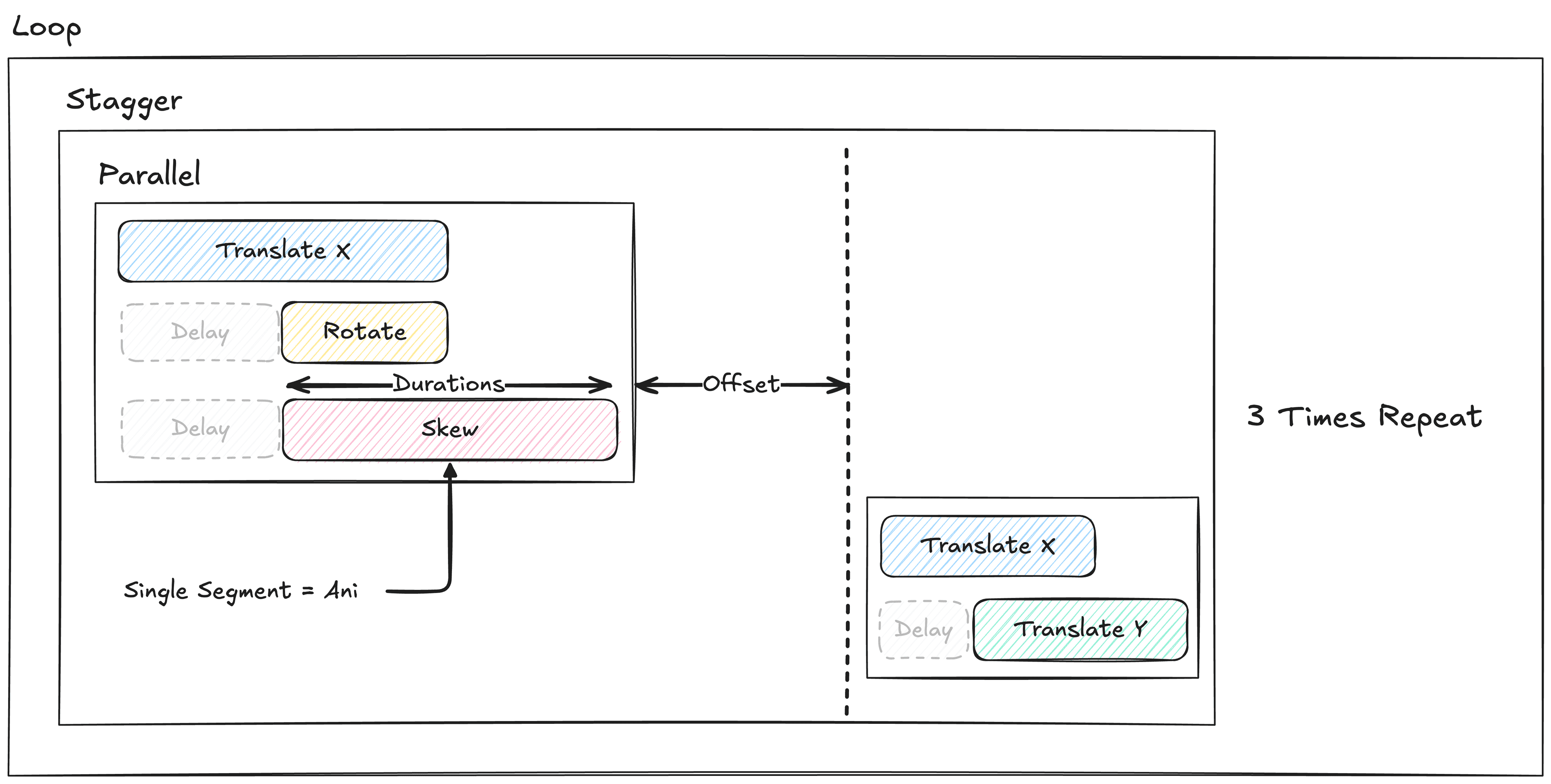
Let's start with some animation keyframes. As you can see above this is kind tricky for defining the structure of animation using code.
But using ani, you can create this animation tree easily.
import { a } from "@freestylejs/ani-core"

const animationTree = a.loop(
  a.stagger(
    [
      // 1. First Group: Parallel execution of Translate X, Rotate, and Skew
      a.parallel([
          a.ani({ to: { translateX: 100 }, duration: 1.5 }),  // Translate X
          a.sequence([
            a.delay(0.75)                                     // Delay 0.75s
            a.ani({ to: { rotate: 180 }, duration: 0.75 }),   // Rotate
          ]),
          a.sequence([
            a.delay(0.75)                                     // Delay 0.75s
            a.ani({ to: { translateX: 20 }, duration: 1.5 }), // Skew
          ]),
      ]),

      // 2. Second Group: Parallel execution of Translate X and Translate Y
      a.parallel([
          a.ani({ to: { translateX: 0 }, duration: 1 }),      // Translate X
          a.sequence([
            a.delay(0.5)                                      // Delay 0.5s
            a.ani({ to: { translateY: 50 }, duration: 1 }),   // Translate Y
          ]),
      ]),
    ],
    0.75, // Offset: Wait 0.5s before starting the second group
  ),
  3 // Loop: Repeat the entire sequence 3 times
)
Yes, after this part you can create static animation keyframes using timeline.
const timeline = a.timeline(animationTree)

// You can now, have full control of animation tree.

timeline.play(targetElement, {
  from: {
    translateX: 0,
    translateY: 0,
    rotate: 0,
  } // set start values.
})
5x Smaller Bundle Size, but Powerful.
It is also much smaller compared to other animation libraries.
ani= 5.6kBmotion= 31.1kBanime.js= 30.8kBgsap= 26.6kB
Core Features
Declarative & Compositional
Build complex animations by combining simple, reusable nodes. Describe what you want to happen, not how, leading to more readable and maintainable code.
End-to-End Type Safety
Leverage TypeScript to catch errors at compile time. Refactor animations with confidence, knowing your data structures are consistent from definition to execution.
High Performance
Animate styles directly on the DOM, bypassing framework render cycles for buttery-smooth, 60fps animations, even for complex, interactive scenes.
Framework Agnostic
The core engine is pure TypeScript. Use our dedicated bindings for React, Solid, Svelte, and Vue, or integrate it into any project.